


Customers prove who they are, climb KYC levels and turn on a soft token on their own phone, adding an extra layer of security to their account. Every face decision is made on the server and kept as evidence for your compliance team. Verifyed runs in your Standalone App, or inside the app you already have through the UNIFOS Super SDK.
Unified Financial Operating System for Banks


Add 2FA Protection Against Fraudsters
Enable 2FA on any account through easy, self-guided onboarding in the Verifyed app.
Passive and active liveness, and face match against BVN and NIN photos, decided on the server.
Every major national ID read and cross-checked: national ID, NIN slip, voter’s card, driver’s licence and passport.
No lock-out when a customer loses a phone: the soft token moves to a new phone after a fresh face check.
Offline mode lets customers use Verifyed even when the phone is not connected to the internet.
With Verifyed, Enhance Customer Security by Turning On Two-Factor Authentication
Self-assisted soft token set-up in the Verifyed app for 2FA
Omnichannel 2FA for fraud protection
Four Checks That Prove a Customer Is Real
Liveness, face match, ID reading and location. Each is captured on the customer’s phone and decided on our servers, never on the phone alone.
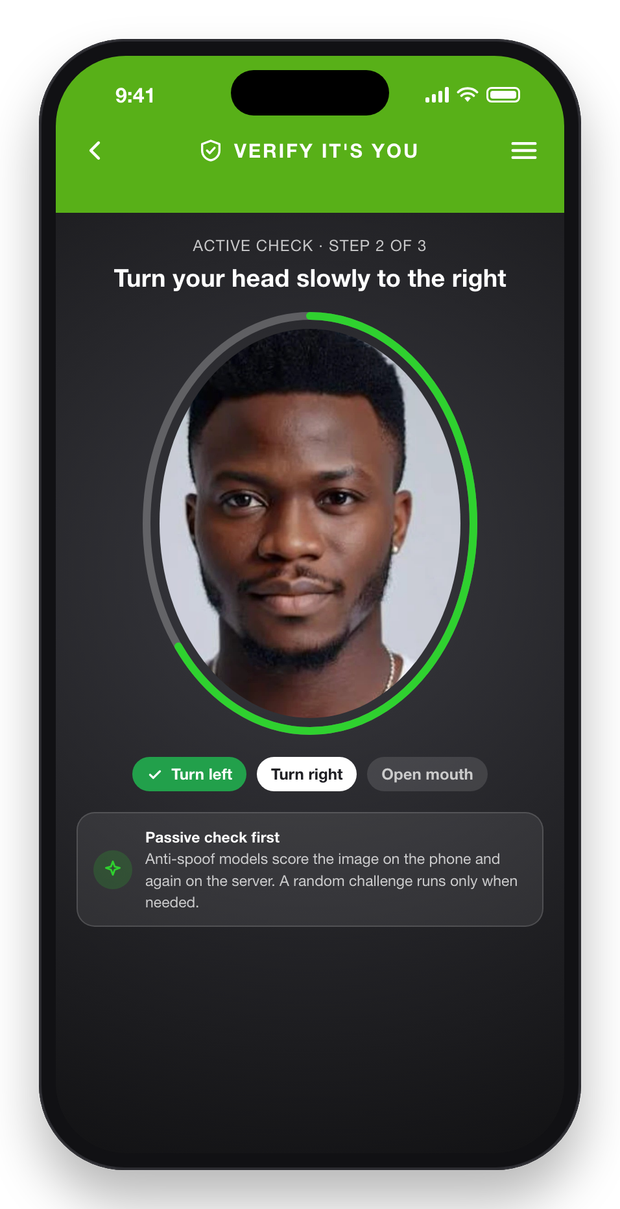
01 · Liveness
A real person, present right now
- 01
Passive check first
Two anti-spoof models score the selfie on the phone. Most customers only take a selfie.
- 02
Random challenge, only when needed
If the score is weak, the customer follows head turns and a mouth movement in a random order that cannot be pre-recorded.
- 03
Re-checked on the server
The same models score the picture again on our servers. The phone never makes the final decision.
- 04
Live frames, used once
Each attempt needs several differing frames and a one-time challenge, and must pass a replay check. Every attempt is logged.
What it stops
- A printed photo held up to the camera
- A photo or video played on another screen
- A frozen or replayed camera feed
- A selfie reused from an earlier session
For your bankFake accounts are refused, and genuine customers never need a branch.
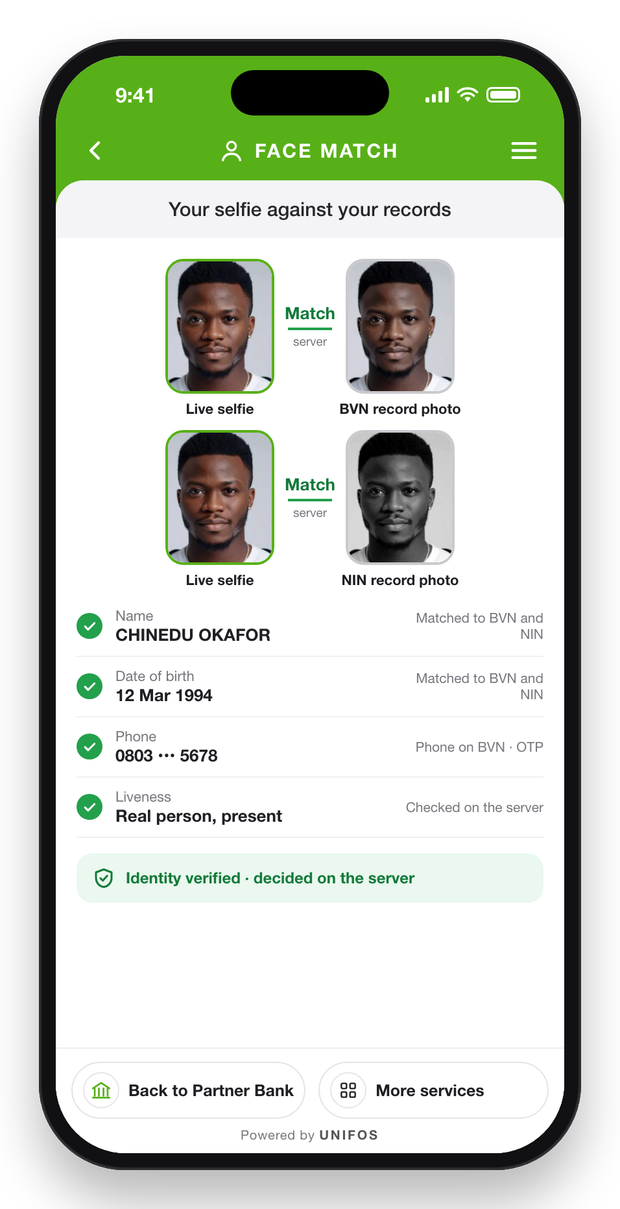
02 · Face match
The selfie against the records that matter
- 01
Against the BVN photo
At onboarding, the live selfie is matched to the photo on the customer’s BVN record.
- 02
Against the NIN photo
At onboarding or as the second ID, it is matched to the photo on the NIN record.
- 03
Against the ID photo
At full KYC, it is matched to the portrait read from the scanned ID.
- 04
Decided on the server
The phone never decides alone. Every decision is logged and kept as evidence.
For your bankThe person opening the account is the person on the BVN and NIN, proven in the app. The same face check runs again when a soft token is set up or a card is activated.
03 · ID reading
Every major national ID, read and cross-checked
- National ID card and NIN slipNIN record and the live selfie
- Voter’s cardName and date of birth on BVN or NIN
- Driver’s licenceName, date of birth and expiry
- International passportMachine-readable lines, check digits, NIN record
The ID photo is matched to the live selfie on every document.
04 · Location and address
Proof of address, without a visit
- Home or shop pinned in the Verifyed app, with a photo of the gate
- Presence at the address checked over 48 hours
- Utility bill or bank statement under 3 months old, name and address matched
- Business premises verified
Together with ID reading, this delivers full KYC without a branch.
Verifyed: Instant Digital KYC and Customer Upgrade
Step 1: Sign-Up
The customer starts in your app: your Standalone App, or the UNIFOS Super SDK inside the app you already have.
Step 2: Facial Biometrics and Liveness Detection
Step 3: Identity Capture and Matching
NIN Verification
BVN Verification
Customer scans or enters NIN
Facial biometrics used to verify identity
OCR captures the NIN slip and matches it to the record
Customer enters BVN; details fetched from NIBSS
Facial biometrics matched with the BVN profile
Step 4: Full ID and Address Verification
ID Document Verification
Residence Verification
Business Verification
OCR reads the ID; facial biometrics matched
Customer scans an accepted ID, such as a driver’s licence or voter’s card
OCR captures and matches the data
Customer uploads a utility bill or other proof of address
Customer selects their residence on the map
CAC registration and directors verified
Customer enters the registration details
Location is selected on the map
Step 5: Verification Done
Once all checks pass, the customer’s profile is approved at the new level. The level syncs to your bank and moves the customer’s limits at once.
KYC Levels the Customer Climbs Alone
Customers see their level and what the next one unlocks, then climb it in your app. No branch visit. No manual review queue.
Verified identity
BVN or NIN, liveness, face and name match, phone OTP
Sign-in and a basic account
Address confirmed
One ID plus a confirmed home address
Starter limits
Second ID
BVN and NIN both verified
Higher limits
Full KYC
Photo ID scanned, address proof under 3 months, home location verified in the Verifyed app
Highest personal limits and credit cards
Businesses
Merchant
Business details and premises verified
Accept QR and SoftPOS
Businesses
Merchant+
CAC, with each director matched by BVN or NIN
POS, agents and a business-name account
Limits per level
Verifyed sets the limits for each level. Your bank applies them.
Synced at once
Every new level is pushed to your bank and moves limits straight away.
Always current
Address proof older than 3 months drops full KYC one level.
Your core, your KYC
For customers on your own core, your bank’s level is respected.
Self-Service Soft Token Set-Up
No branch. No call centre. No paper form. The customer proves who they are with their face, and the token is live.
30-Second Codes, No Network Needed
The soft token lives in the Verifyed app on the customer’s own phone. Customers use it to sign in, reset a password or PIN and confirm every digital payment after the PIN.
Codes every 30 seconds, offline
Generated on the phone. No network, no SMS and no delay. Only set-up needs a connection.
One phone per customer per bank
Bound to the customer, the phone and your bank. A new phone needs liveness and face match again, and the old one stops.
One token for every account
Personal and business accounts at your bank share the same token, in your bank’s name.
The second factor
After the PIN, the customer confirms each digital payment with the code. Verifyed validates it and the payment books.
Optional for your staff
Your teams can use the same token on the Partner portal, if you choose. A lost one is reset by maker and checker, each signing with the UNIFOS portal PIN.
Your bank can check it too
For Super SDK banks, IMS, our Institution Management System on your premises, can also validate codes inside your own data centre.
For your bankOne second factor for customers and staff, with no SMS to wait for.
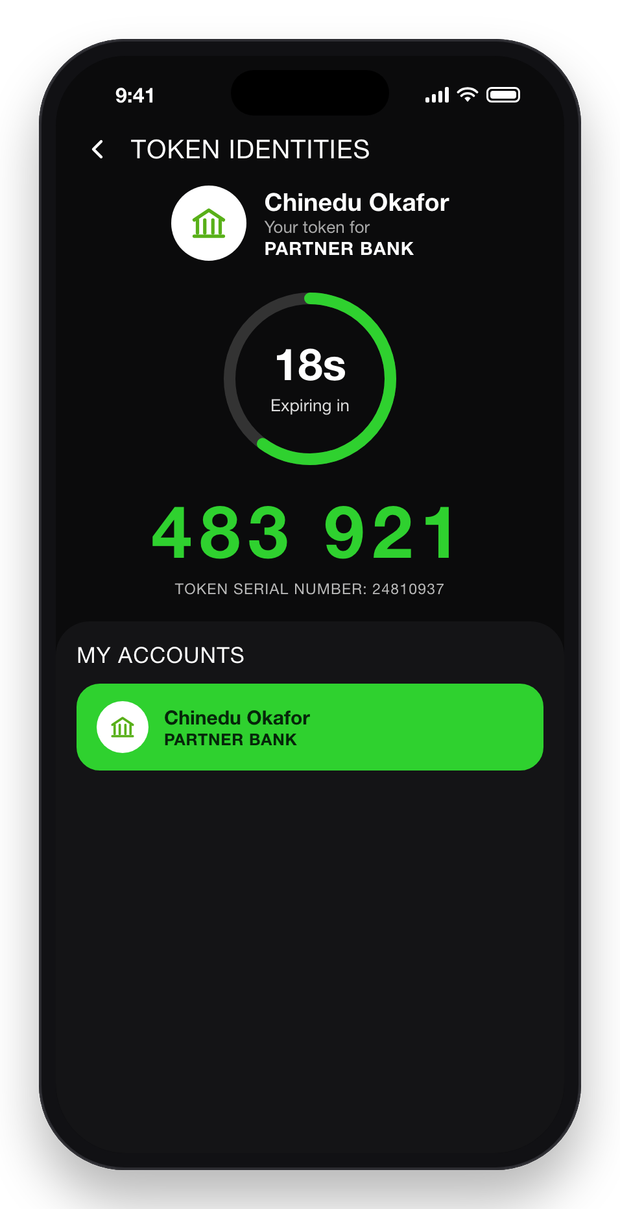
Soft Token Verifications: Use Cases
Mobile Banking
Online Banking
Transaction Authentication
Forgot Password or PIN
New Card Confirmation
2FA for Partner Portal Sign-In
The Verifyed Portal, for Your Compliance Team
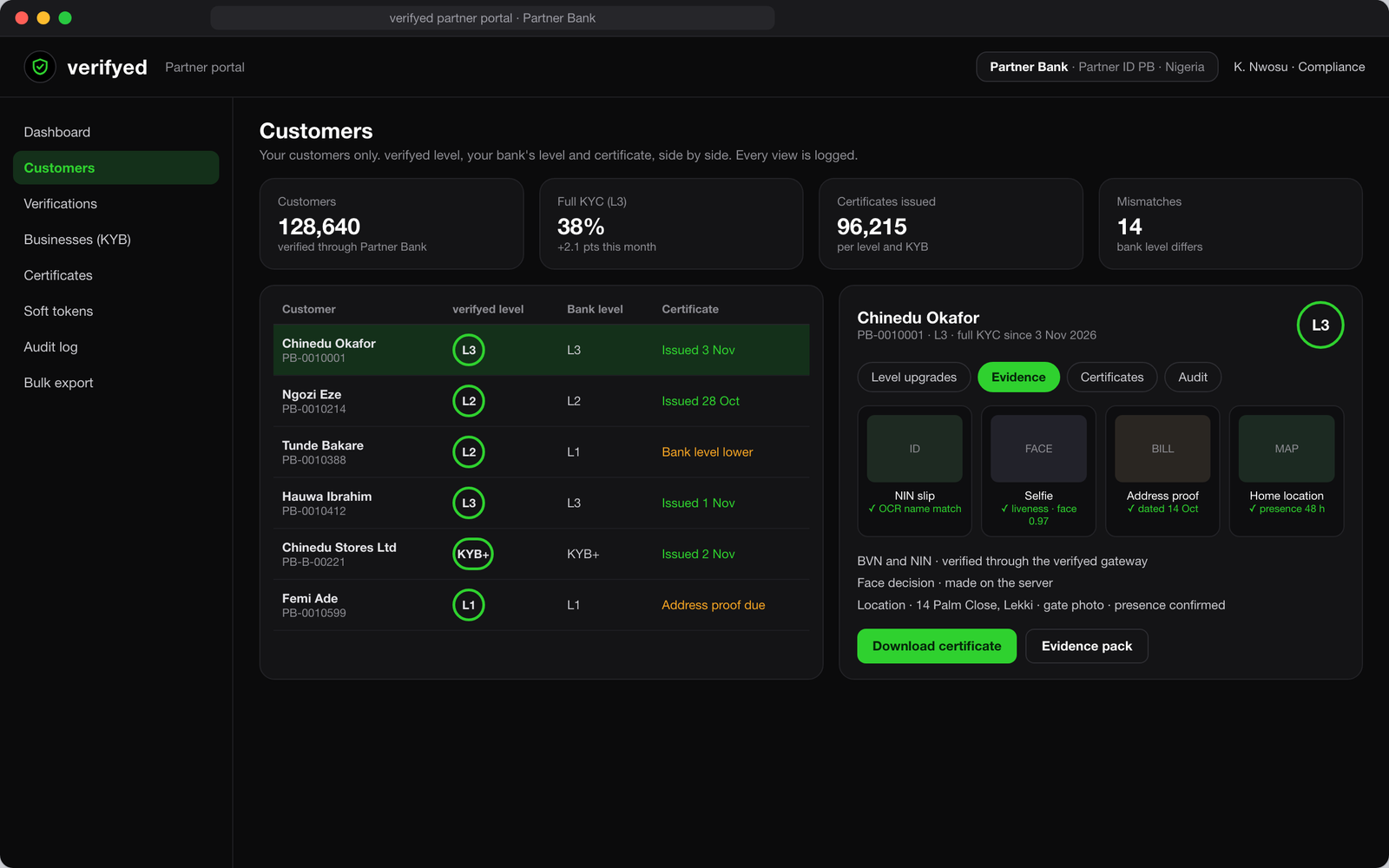
KYC you can show the regulator in minutes, with every view of every document logged.
KYC management
Your customers only
The Verifyed level, your bank’s level and the certificate, side by side.
Evidence behind every level
ID, selfie, address proof and home location, with each check’s result.
Certificates and regulator packs
A sealed, QR-checkable certificate per level, and evidence packs on request.
Businesses and mismatches
KYB records for business customers. Where your level and Verifyed’s differ, it is flagged.
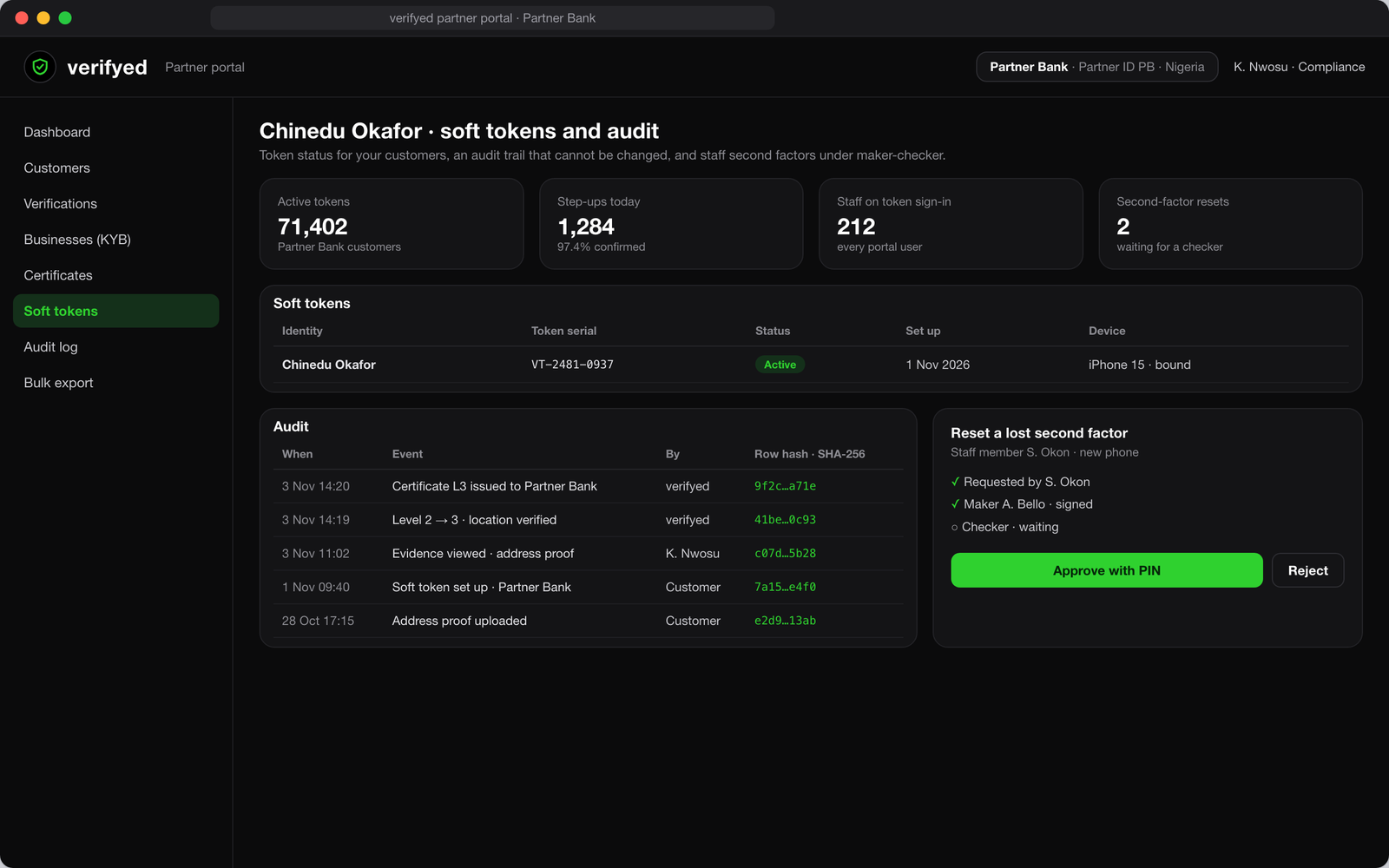
Soft tokens and audit
Every customer’s token
Serial, status, set-up date and the bound phone.
Today’s confirmations
How many payments customers confirmed with the token.
A sealed audit trail
Every level change, certificate and evidence view, each row sealed with a hash.
Optional for staff
Staff can use the same token on the Partner portal, if you choose. Resets need a maker and a checker.
Lasting Value for Banks Across Africa
Secure payments keep customers safe and unlock digital growth.
More customers through onboarding, verified in the app with no branch visit.
No SMS codes: the PIN is the first factor and the Verifyed code is the second on every digital payment.
KYC you can show the regulator: certificates, evidence and a sealed audit trail on the Verifyed portal.
Explore Other Products

- BALANCE · Digital Banking
- Digital and business accounts
- Credit card and prepaid card accounts
- Loan accounts
- Reward points and redemption accounts

- ScanPay · Pay by QR
- Any merchant’s interoperable QR, any bank
- Static and dynamic QR codes
- Instacard, BALANCE account or another bank’s card
- Checkout on merchant sites

- Accepto · Merchant Acceptance
- SoftPOS for contactless payments
- POS terminals
- Payment links and online checkout
- Digital business accounts for settlement

- Instacard · Virtual & Universal Cards
- Virtual and physical card issuance
- Debit, credit, prepaid and gift cards
- Universal card
- Dynamic CVV for online payments
- Contactless payments with virtual cards

- Ace · AI Credit Exchange
- Three-way underwriting with an AI Checker
- Loan and credit card origination
- Portfolio management
- Collections and repayments

- DTS · Dual Transaction Service
- Virtual credit cards
- Credit on existing debit cards
- Collections and repayments
- Dynamic limit management

- Fundu · Agency Banking
- Cash deposits and withdrawals
- Bills, airtime and data
- Universal card pick-up
- Verified agents only

- Guida · In-App Assistant
- Understands requests in multiple languages
- Guides customers through every product
- Tickets for disputes, tracked to resolution

- Rewa · Loyalty Management
- Customised reward programmes
- Reward points and redemption accounts
- Points, cashback and tiers
Frequently Asked Questions
Verifyed includes soft token generation. It adds a second layer of security for sensitive actions such as sign-ins, payments and PIN resets, fully managed in the separate Verifyed app on the customer’s phone.
Launch the Future First
Launching a digital bank? Adding products to your app? Get your own mobile bank in your brand, or the UNIFOS Super SDK inside your app. Tomorrow’s banking, live today. Launch in weeks, on a revenue share.